
Access JumpStart 2.0 | Blog
A Rapid Development Framework for Microsoft Access
Recent Articles
VBA Compiler Constants are handy… beware of the details
You can control how your project is compiled. Have one “source base” that you use for multiple purposes, environments, or in multiple “modes” of operation. You can use Microsoft defined Compiler Constants and you can define your own....
Using the Access Web Browser Control
The Access Web Browser Control is not a Web Browser Object, but does contain one. To access the internal workings of the control with VBA code, it is most convenient to dimension and use variables as follows, where the name of the control is “MyWebBrowserControl”: DIM...
acCmdDeleteRecord – unintended problems
Case Study The issueA form contained several combo boxes linked to tables, sub-forms, and a delete button intended to delete the current record. The client noticed while deleting records that occasionally one of the combo box linked records would get...

MS Access Runtime Error (2176): “The setting for this property is too long.”
This error occurs because, drum-roll please.... The setting for this property is too long. So in this particular case, the developer was trying to create a long SQL string using multiple UNIONs with a complex query and trying to set this string to the RowSource...

What do those error codes mean?
So you're updating some VBA code you wrote a while back... Now what is the Error Processing section doing? What do those Error Numbers mean? I shoulda' written some comments! Well you can just look up each of those error descriptions quickly by using the AccessError()...

Your Access Application has Crashed! What to do?
So your Access application crashed and user feedback is not specific enough to diagnose the problem? It sure would be nice if your application VBA code could send you an email with all the error details! Well, The Smiley Coder has written and published just such a...

Gotcha! You thought you deleted a subform record but…
I recently experienced a frustrating issue that had me scratching my head for a while. I had a PO form with a Line Item subform and I could edit lines and when I tried to delete a line it was removed from the subform. BUT... If I closed and reopened the same PO...

Print button on Ribbon prints form instead of report
So I had a form that opened a report using a function in another module using DoCmd.OpenReport. This worked fine and the report popped open and appeared to be the active object on the screen. However, it was not. The behavior this caused was that when I clicked on the...

Friendly Form Auditing in Microsoft Access
Recently, a customer requested that all changes to their form be logged and added to the email that is sent to the project manager associated with the project assigned to the form. I found some code to walk a form during the BeforeUpdate routine and look for and...

Centering content on a form using Layouts
As you mention, you could determine the available screen space. You are going to have a somewhat complex job because you will have to set the top and left of every visible control on the screen. That is one way of doing it that will work. The other way...
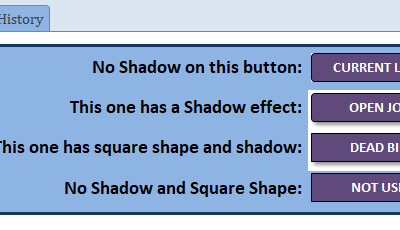
Wrong background colors on buttons with shadows
Jon: Fix is either in the on open or on click events Jon: The issue occurs for me only when hovering over the button. See attached database for the simple workaround solution for this issue. I do think this is a bug in Access but at least there is a workaround for it....

Updating the Access Front End for a client
If you have worked with Access Front Ends and Back Ends on a client network with many users, you may have experienced some of the difficulties of making updates to the Front End to apply new updates to forms and reports for the end users. Having a front end in general...

Quick Links
About
Our goal is to help people simplify their business by providing software products to streamline their work.
Contact
(630) 423-4994
info@halderconsulting.com